Apps that actually listen to your lines (and the ones that just play audio)
“Listens to you” covers three different things in line-learning apps: playing audio with gaps, hearing when you have finished a line, and checking the words you said against the script. Most apps that listen today do the second, not the third. We make MasteringTheatre, which is in the third group; this page sorts the apps we checked on 6 October 2026, ours included, and gives a two-minute test you can run on any of them.
Short answer
Players (LineLearner, Rehearsal Pro) play recordings and never hear you. Cue listeners (coldRead, ScenePartner, Linus, ActingPal, ActOnCue, Rehearsed, ActorCue) hear when you finish and play the next line. Word checkers (Understudy, MasteringTheatre, and blablabla's “deviations” tracking) also compare what you said with the text.
Why the difference matters
Running lines has two jobs: getting the cue on time, and finding out whether you said the line as written. A player handles neither by itself: it plays your recording on a fixed rhythm. A cue listener solves the first job: the scene waits for you, then moves. Only a word checker handles the second. If you paraphrase the middle of a speech but land the last word, a cue listener carries on happily, and the paraphrase follows you onto the stage.
Neither approach is wrong. For a self-tape tomorrow, a fast cue listener may be all you need. For a play where the writer's exact words matter, you want to know which words drifted.
Family 1: players (they do not hear you)
You record the scene and playback leaves room for your part. The two listings below mention no speech recognition.
- LineLearner (iOS, $3.99 once): you record the scene, choose to leave gaps for your part, and press a prompt button if you forget. Castmates can record and share their lines.
- Rehearsal Pro (iOS, $19.99 once): you record your lines and play them back while the script scrolls like a teleprompter, with a “blackout mode” to test yourself.
ActingPal also offers a timed rehearsal mode, where each line gets a set number of seconds, if you prefer a fixed rhythm.
Family 2: cue listeners (they hear when you stop)
These apps use speech recognition to detect the end of your line, then play the next one. Their listings describe the cue, not a word check:
- coldRead (iPhone, iPad, Mac): “When you say the very last word of your line (the cue), coldRead will ‘read’ the following line back to you.” Recognition happens on the device. Last App Store update: 3 December 2022.
- ActorCue (iOS): assign a cue word; “when ActorCue hears your cue, it instantly plays the reader's response”. It is built around a real reader's recorded audio, with text-to-speech as a stand-in.
- ScenePartner (web, iOS): “listens for your cues and speaks the other lines in real time.”
- Linus (iOS, Android, web): waits for your cue, “only responding when you've finished your line. Paraphrase when needed.”
- ActingPal (iOS, Android): “actively listens, recognises when you've finished your line, and responds naturally”.
- ActOnCue (iOS, web): “Listens and recognizes cues, and responds on cue.”
- Rehearsed (iPhone, web): “hears you land the end of the line, and the scene moves on its own”; it also counts how often you ask for a hint.
Family 3: word checkers (they compare what you said)
- Understudy (iOS): listens, detects when your line is complete, and shows “how close you are to being off book at the line level after every rehearsal”.
- blablabla (iOS, Android): Practice mode “listens for your line and advances automatically”, and the app tracks sessions including “deviations”. Its listing does not say how deviations are shown.
- MasteringTheatre (ours; Android, iOS): on-device recognition transcribes your line; you get a percentage of text accuracy per line, ≥ 90 % green, ≥ 70 % gold, red below. At the end of the scene, the review colours the words you missed or changed.
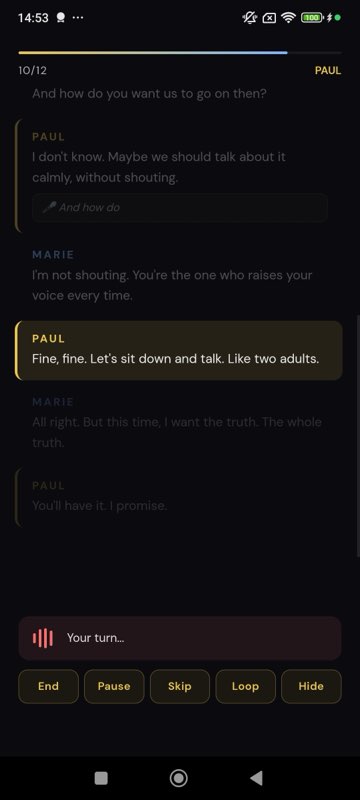
How MasteringTheatre decides a line is finished
Two ways. On every plan, step-by-step mode waits until you tap Validate. On Pro (€2.99/month; store prices vary by country), fluid mode validates after a silence you set, from 0.5 to 10 seconds (2 seconds by default), so the scene runs hands-free. Scoring forgives homophones at every level; by default it also accepts close-sounding words, and only the strict setting refuses them.
The two-minute test
Run this on a free tier or trial before paying:
- Import a short scene and pick a role with a line of at least 15 words.
- Say the line correctly. Note what the app does.
- Say it again, swapping one word in the middle for a clearly different word, and keeping the last word.
- Say it a third time, skipping the middle of the line but saying the end.
A player behaves the same all three times. A cue listener that keys on the end of the line moves on at steps 3 and 4 as if nothing happened. A word checker should show a lower result at steps 3 and 4. (In MasteringTheatre, a close-sounding swap can still pass on the default lenient setting; a clearly different word cannot.) That one test tells you which family you have, whatever the store page says. Prices and platforms for each app: best apps to run lines; if you are leaving ScenePartner: ScenePartner alternatives.
What MasteringTheatre does not do
- No live correction. It never stops you mid-line; the score comes after the line, the coloured words after the scene.
- The score is not about acting. It measures text accuracy only.
- No self-tape, and no emotion setting for the partner.
- Hands-free fluid mode is Pro. The free plan uses the Validate button.
Questions actors ask
Do apps that listen send my voice to a server?
It depends on the app. coldRead says recognition happens on the device. In MasteringTheatre, speech recognition runs on the phone. For other apps, check their privacy page before you rehearse unreleased material.
Can a cue-listening app tell me if I paraphrased?
Not from what their listings describe: they detect the end of your line. Linus even states “Paraphrase when needed”. To see changed words, use an app that compares your line with the script, or run the two-minute test above.
Does a high score mean I am ready?
It means you said the words. Being ready also means playing the scene with a partner and a director. A line at 100 % can still be badly acted.
What if the app mishears me?
All speech recognition makes mistakes, with accents, noise and fast speech. In MasteringTheatre, the default scoring is lenient about close-sounding words, and you can rehearse in a quiet room. Pro can switch to normal or strict.
Which languages does MasteringTheatre listen in?
10 on Android: French, English (UK and US), Spanish, German, Brazilian Portuguese, Italian, Dutch, Polish and Russian. 5 on iOS: French, English (UK and US), Spanish and German.
Sources
All checked on 6 October 2026; quotations are from the maker's own page or listing.
- LineLearner: App Store listing id368070258.
- Rehearsal Pro: App Store listing id1116896197 (price, record and playback, blackout mode).
- coldRead: coldreadapp.com; App Store listing id1264354117.
- ActorCue: App Store listing id6479657608.
- ScenePartner: scenepartner.club.
- Linus: getlinus.app; App Store listing id6742599484.
- ActingPal: actingpal.com; App Store listing id6736730265.
- ActOnCue: actoncue.com.
- Rehearsed: rehearsed.app; App Store listing id6766136848.
- Understudy: get.understudy.app.
- blablabla: sayblablabla.com; App Store listing id6760597750.
Import one page. Run one line. See a % score.
Free plan, no card. Android (10 languages) and iOS (5 languages). Pro 2.99 €/month, Premium 4.99 €/month.
Get the app →This page describes the app as it was on 2026-10-06. A score measures text accuracy, not talent. Published 2026-10-06.