Audition monologue practice: out loud, until the words disappear
The panel is not listening for the words. They will only hear the words if you reach for one. Monologue practice therefore has one goal: make the text so secure that it becomes invisible, so that what is left in the room is you. Rereading does not do that. Saying it out loud, on a beat, with an honest count, does.
Turn the monologue into lines
A monologue has no cues from another character, which is why it feels harder to secure than a scene. Give it cues: break it into beats of one to three sentences, each beat a change of thought, and write it out one beat per line. Now the end of each beat is the cue for the next. In MasteringTheatre you paste it under your character's name, one beat per line; the app treats each beat as a line, waits for it, scores it, and moves on.
Three passes with blanks
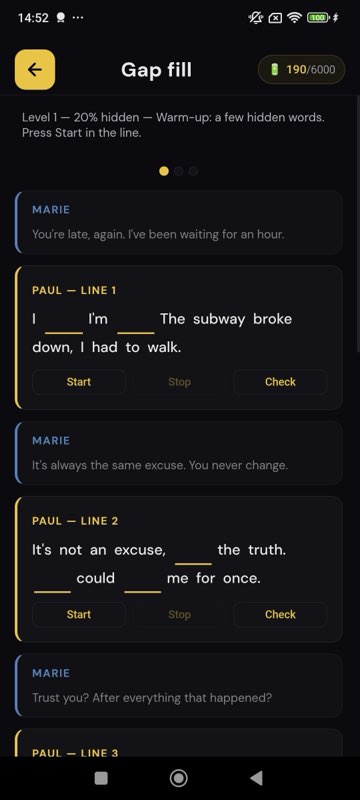
Use memorisation mode before you try to run it: 20 % of the words hidden, then 50 %, then 80 %. The mask prefers the words that carry meaning and is the same every time you rerun a level, so you drill the same gaps; the “check” button reveals a beat when you are stuck and counts it, which is fair. Level 1 is free; levels 2 and 3 are on the Pro plan. Nothing here uses credits.
Then say it to something that listens
Hide the text and run the monologue beat by beat. On-device speech recognition transcribes each beat and scores it: ≥ 90 % green, ≥ 70 % gold, below red. In the free step-by-step mode you tap Validate after each beat; in fluid mode (Pro) a silence you set validates it, so the speech flows. The prompter (Pro) can show the first words of a beat after 3 to 15 seconds if you dry, a nudge rather than the page.
At the end, the review highlights the words you missed or changed. With monologues, the changed words are almost always synonyms you prefer and lists whose order you have not fixed. Drill those, in their beats, with exaggerated stress, five times. Not the monologue. The words.
Practise at three speeds
Nerves speed you up. Run the monologue once slow, once at your intended pace, once deliberately fast, all with the text hidden. If the words survive the fast run, they will survive the room. If a beat collapses only at speed, it is a list or a near-duplicate line; give it its own five minutes.
What to do when the words are secure
Stop scoring. Put the phone away, stand where you will stand, choose whom you are speaking to, and do it for the acting. Optionally, the AI direction feature (Pro) will write a note per beat, intention, subtext, tone, one to three words to stress, a physical or rhythm suggestion, as a starting point to argue with; the notes are not stored beyond the session. The score you got earlier measured text accuracy, not talent; the panel measures the other thing.
If you have no monologue yet
Training Audition (Pro) generates an original monologue from a few choices (genre, gender, age, length) for two energy credits; you can save it and rehearse it with the same loop. For a panel expecting a published text, use a published text; for a workshop round, a practice run, or a self-tape exercise, it beats an empty page.
A 30-minute monologue session
- Beats written one per line, imported (4 min).
- Blanks 20 %, 50 %, 80 %, out loud (10 min).
- Hidden run, beat by beat, scores; red beats twice (7 min).
- Review; changed words drilled in their beats (5 min).
- One run at speed, one run for the acting, no phone (4 min).
Monologue questions
Does the app read the monologue to me?
No; there is no other character to voice, and hearing your own speech read by a synthetic voice would teach you its rhythm. It waits for each beat, scores it, and reviews the whole afterwards.
How long should the beats be?
One to three sentences, one thought each. Shorter beats give finer scores and finer cues; very short beats make the run choppy.
Can I keep several monologues ready?
Yes. Imported texts and generated monologues can be saved; the free plan keeps three favourites, Pro and Premium more.
Does it work for classical verse?
Yes; scoring compares the words you said with the text. Names and archaic words are recognised less reliably, so read the review with that in mind and, on Pro, choose a strictness that suits the text.
Which languages?
11 on Android, 6 on iOS, English UK and English US separately.
Import one page. Run one line. See a % score.
Free plan, no card. Android (11 languages) and iOS (6 languages). Pro 2.99 €/month, Premium 4.99 €/month.
Get the app →This page is written from the app as it is today (September 2026). A score measures text accuracy, not talent. Published 2026-09-14.