How to practice sides: work the pages, not the play
Sides are not a play. They are two or three pages, one role, a scene that starts in the middle and ends before the end, with a deadline measured in hours. Practising them like a play (read everything, understand everything, then learn) wastes the hours. Here is how to work sides as sides.
Get them into a form you can work with
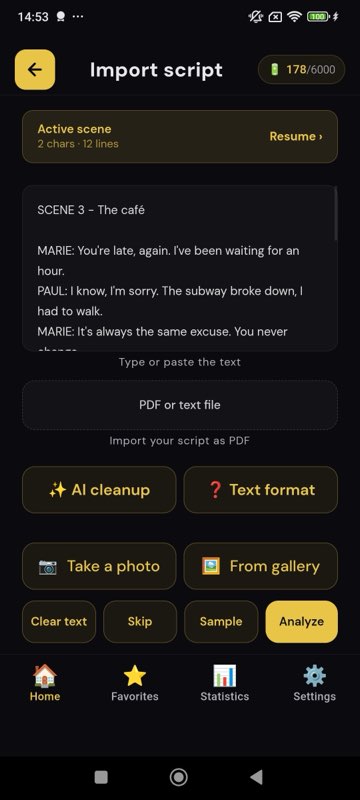
Sides arrive as a PDF, a screenshot, a photo of a page, an email. Get them into something that can speak the other roles to you. In MasteringTheatre you paste the text, open the PDF (text is extracted on the phone) or photograph the pages, up to six per import, with text recognition on the Pro plan; the free plan accepts up to 5,000 characters per import, which is most sides. The app detects the characters; you select the passage in two taps and choose your role.
Mark them in five minutes
- Underline your cues: the last three to five words of every line before yours. They are the triggers you will learn as part of your line.
- Bracket the beats of any speech longer than three lines. Each beat becomes a unit with its own cue.
- Circle the traps: lists, numbers, names, two lines that begin alike, the word you already want to replace with a synonym.
- Pick the cut. If they will ask for pages 2-3, work pages 2-3 first. Everything else is second.
Learn them on a cue, not from the page
Run the passage with the other roles spoken to you and your lines visible, once, for rhythm. Then hide your lines and run it again. Each line gets a score, ≥ 90 % green, ≥ 70 % gold, below red; red lines twice, then next, never back to the top. In the free step-by-step mode you tap Validate after each line; in fluid mode (Pro) a silence you set validates it, so the pages flow.
For a speech, use memorisation mode first: 20 %, 50 %, then 80 % of your words masked (level 1 free, levels 2-3 Pro), then the spoken run.
Read the review before you decide you know it
At the end, the review highlights every word you missed or changed. With sides the list is short and brutal: the circled traps, plus one synonym you did not see coming. Drill those words in their lines, with their cues, three times. Then one clean run, no repeats. That run is the one you should be able to reproduce in the room.
Sides for a callback or a chemistry read
They will change the cue. The reader will be faster, slower, flatter than you imagined. Rehearse the spoken cue at different speeds (0.8-1.2× free, 0.5-2× Pro) so the line does not depend on one rhythm. If you know who will read with you and they are willing, their lines recorded once as a voice pack give you their real rhythm at home (using a pack needs Pro).
Sides for a shoot
New pages at 9 pm, call at 7: two short sessions, one tonight and one at 6 am, with sleep between, beat one long cram. The two-session split is on the page Learn lines overnight. For rewrites in the morning, paste only the changed passage and run it hidden once; the review shows the old words fighting the new ones.
What sides work is not
It is not character work, not a reading of the whole script, not a self-tape (the app does not film; it rehearses). And a score is text accuracy, not a note on the acting: it tells you whether you said the words, so that in the room you can think about something else.
The 30-minute sides routine
- Import and mark (5 min).
- Spoken cues, lines visible, once (4 min).
- Blanks 20 % then 50 % on any speech (6 min).
- Spoken cues, lines hidden; red twice (8 min).
- Review; drill the list in its lines (5 min).
- One clean run, then stop (2 min).
Sides questions
Can I import sides from a screenshot?
Photographed or screenshot pages go through text recognition on the Pro plan (up to six images per import). On every plan, a PDF with real text is read on the phone, and pasted text is immediate.
What if the sides have a character with no name, like “MAN 2”?
The app uses whatever name precedes the colon on each line; “MAN 2” is a character like any other, and gets a voice you choose.
Do I need to learn the other character's lines?
Only their last few words, the cues. You need to hear the rest, which is why the app speaks them.
How strict is the scoring?
Homophones always pass; the default lenient setting also accepts close-sounding words. On Pro you can set it to normal or strict.
Does it work in English UK and US?
Yes, as two separate recognition languages, among 11 on Android and 6 on iOS.
Import one page. Run one line. See a % score.
Free plan, no card. Android (11 languages) and iOS (6 languages). Pro 2.99 €/month, Premium 4.99 €/month.
Get the app →This page is written from the app as it is today (September 2026). A score measures text accuracy, not talent. Published 2026-09-14.