Self-tape prep: three runs before you open the camera
Most bad self-tapes are not lighting problems. They are text problems: the actor is half a second behind the cue, eyes drop to the sides, take 6 is the one where the words finally came out and the acting had gone. Fix the text first, then film.
Plain disclosure: MasteringTheatre is a rehearsal partner, not a self-tape recorder. It does not film you, frame you or upload anything to a casting platform. It gets you off book and cue-safe, then you use your camera app as usual.
Why the reader is the real problem
A self-tape needs a reader: somebody to say the other lines, off camera, at a steady level. Half the time the reader is a partner reading badly, a friend on speakerphone, or nobody, with you reading both parts in your head and hoping the pause looks natural. The consequences show on tape: late reactions, eyes searching, lines you know perfectly at the kitchen table but not when a real voice cues you.
The fix is to rehearse with a real, spoken cue before the camera is involved, enough times that the cue itself pulls the line out of you.
Run 1 — Words only, sides in hand
Import the sides (paste, PDF, or a photo of the pages on Pro), choose your role, and let the other parts be read to you. Keep your lines visible. Speak your lines at performance volume, not muttered. The point of this run is rhythm: you hear where the cue ends and your line starts. Do not act yet; anything you fix now is text.
Every line gets a score (≥ 90 % green, ≥ 70 % gold, below red). Anything red, say twice and move on. Do not restart the scene.
Run 2 — Lines hidden, eyes up
Hide your own lines (you can hold a button to peek, but every peek is a fact you should notice). Now the cue comes from the spoken partner and nothing else. This is the run that reveals which lines you only know by sight. If you dry, the prompter (Pro) shows the first words of your line after a delay you set, 3 to 15 seconds, so you get a nudge without seeing the whole line.
Keep your eyes where the reader's eyes would be, just beside the lens. If they drop to the phone, you are not off book yet. Run it until one clean pass.
Run 3 — Fluid, no touching the phone
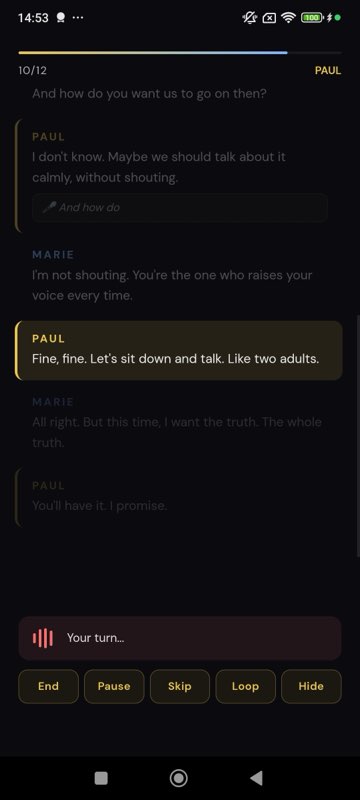
On Pro, switch to fluid mode: the app validates each line after a silence you choose (two seconds is a good default for sides) and the scene flows without a tap. Put the phone where the reader would stand, at the level of your eyeline, and do the scene as if the camera were on. Then read the review: it highlights every word you changed or missed. If the review is clean, film. If it is not, you have just saved yourself six takes.
Reader's voice: synthetic or real
System voices are fine for the drill. If the casting note asks for a specific energy, or you simply prefer a human cue, a partner can record their lines once into a voice pack; the app then plays their real voice as your cue, and still listens to you (using a pack in rehearsal needs Pro). For the actual tape, you may still want a live reader; that is a filming choice, not a rehearsal one.
The morning-of checklist (text part only)
- One run with lines hidden, all green or gold.
- The three words you changed yesterday, said five times each with the author's stress.
- The first line of each side said cold, out of order, no cue.
- Phone at eyeline, sides on the floor, not in your hand.
- Now light, frame, slate, record.
What this does not cover
Framing, lighting, backdrop, slate format, file naming, upload deadlines: real questions, well covered elsewhere, and unrelated to whether you know the words. This page is only about the part that ruins takes silently. Get the text out of the way, and the tape becomes about the acting, which is the only thing they are watching.
Self-tape questions
Can the app record my self-tape?
No. It does not use the camera. It rehearses with you (spoken cues, listening, scores, review); you film with your usual camera app or setup.
Can it be my reader while I film?
You can play the partner's lines from the app while another device records, but the app is built for rehearsal, not for being an off-camera reader during a take; timing is controlled by silence detection, not by a director.
How fast can I get sides in?
Pasting text is immediate. A PDF with real text is read locally. Photographed pages (up to six) go through text recognition on Pro, typically a few seconds.
Does it judge my performance?
No. The score is text accuracy. The optional AI direction feature (Pro) gives per-line notes on intention and stress, as suggestions.
Which languages work for sides?
11 languages on Android and 6 on iOS, with English UK and English US as separate recognition languages.
Import one page. Run one line. See a % score.
Free plan, no card. Android (11 languages) and iOS (6 languages). Pro 2.99 €/month, Premium 4.99 €/month.
Get the app →This page is written from the app as it is today (September 2026). A score measures text accuracy, not talent. Published 2026-09-14.