How to run lines alone
Your scene partner is not available, rehearsal is tomorrow and your roommate is tired of reading Ophelia. Here are five ways to run lines without a partner, ranked from “works in a pinch” to “feels like a real read”.
Why running lines alone is harder than it looks
Learning a scene is not only about your own lines. It is about the cue: the last words of the other character that trigger yours. When you read the whole page silently, your brain sees the cue and the answer together, so it never has to retrieve anything. On stage, the cue arrives from outside, out loud, with a gap in it. That gap is where lines get lost.
So a good solo method must do three things: hide your line, deliver the cue out loud, and tell you afterwards whether what you said was actually the text.
Method 1 — The cover sheet (free, low tech)
Cover the page with a card, slide it down one line at a time, say your line before you reveal it. It works for memorisation, but the cue is silent, you read it in your own head, and nobody tells you that you said “I never wanted this” instead of “I never asked for this”.
Good for: a first pass on a monologue. Weak on: cues, rhythm, honest feedback.
Method 2 — Record the other roles yourself
Record the partner's lines on your phone, leaving a silence for each of yours, then play it back and answer. This is the classic “italienne” drill and it is genuinely useful: the cue is out loud and the timing is real. The cost is preparation time (a two-page scene takes 15-20 minutes to record) and the silences are fixed, so when you stumble the recording does not wait for you.
Method 3 — Ask a text-to-speech reader
Several apps read the other characters with a synthetic voice and pause for your line. That solves the cue problem. What most of them do not do is listen: they wait a set number of seconds and move on, whether you said the line perfectly, half of it, or nothing at all. You still have no idea which words you dropped.
Method 4 — An AI scene partner that listens and scores
This is what MasteringTheatre does, and it is worth being precise about it, because “AI” gets oversold. Here is the actual loop, as the app works today:
- Import the scene. Paste the text, open a PDF or a text file, or photograph the printed pages (photo import needs the Pro plan). The free plan accepts up to 5,000 characters per import, which is roughly two pages.
- Pick your passage and your character. Two taps to select the start and the end; then choose the role you play. Every other role gets a voice.
- The app speaks the other roles with the phone's system voices on the free plan, or with HD cloud voices on Pro and Premium, then waits for you.
- You say your line. On-device speech recognition transcribes what you said. In the free step-by-step mode you tap “Validate” when you are done; in the fluid mode (Pro), the app validates by itself after a silence you set between 0.5 and 10 seconds.
- You get a score for the line: ≥ 90 % green, ≥ 70 % gold, below red. Then “Repeat” or “Next”.
- At the end, the review highlights the words you missed or changed, line by line. That is where the “I never wanted this” slips show up.
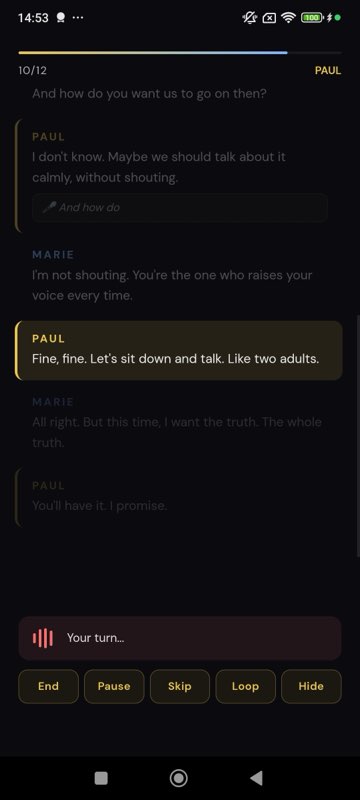
Two things it deliberately does not do: it never interrupts you, and it never corrects you out loud mid-scene. The scene runs; the feedback comes after. If you need the first words of a line, the prompter (Pro) shows them after a delay you choose, 3 to 15 seconds, so you get a nudge instead of the whole answer.
Method 5 — Your real partner's voice, recorded once
When you rehearse with a fixed partner, the ideal cue is their voice, with their rhythm. MasteringTheatre lets a partner record their lines once, line by line, into a voice pack that stays on your phone. From then on, when they are not there, the app plays their real voice as the cue and still listens to you and scores you. Recording is free; using a voice pack in rehearsal needs the Pro plan.
A 20-minute solo protocol
One scene, one evening
- Read once out loud, both roles, no stopping (3 min).
- Run it with cues, your lines visible, aiming for rhythm not accuracy (5 min).
- Hide your lines and run it again. Every red or gold score: repeat that line twice, then move on (8 min).
- Read the review. Write the three words you keep changing on a sticky note. Those are tomorrow's work (2 min).
- One clean run, no repeats, no prompter (2 min).
Two evenings like this usually beat one three-hour cram, because retrieval with a real cue is what sticks.
What running lines alone cannot replace
A partner gives you eyes, impulses and surprises. An app gives you the text, the cue and an honest count. Use the second so that the first is not wasted on “sorry, line?”. A score of 94 % means you said the words; whether you meant them is still your job, and your director's.
Questions actors ask
Do I need someone to record the other lines?
No. The app speaks every role you do not play with a synthetic voice, straight from the imported text. Recording a real partner is optional.
Does it work offline?
Speech recognition runs on the device, and rehearsing with system voices needs no credits and no server. HD voices and AI features use the network.
Can I run only my lines, without hearing the partner?
You can hide your own lines and reveal them by holding a button, but the partner's cue is always spoken, because the cue is the point of the exercise.
Which languages are supported?
11 languages on Android (French, English UK, English US, Spanish, German, Portuguese, Italian, Dutch, Polish, Russian, Turkish) and 6 on iOS (French, English UK, English US, Spanish, German, Russian).
Is the score a judgement of my acting?
No. It measures how close your spoken words were to the text, with a strictness you can set on Pro (lenient, normal, strict). Acting notes exist separately, per line, in the AI direction feature.
Import one page. Run one line. See a % score.
Free plan, no card. Android (11 languages) and iOS (6 languages). Pro 2.99 €/month, Premium 4.99 €/month.
Get the app →This page is written from the app as it is today (September 2026). A score measures text accuracy, not talent. Published 2026-09-14.